
Technology around the home keeps getting smarter, and Eufy’s video doorbells are a great example of that progress. They let you see who’s at the door, talk to visitors, and keep an eye on packages; all from your phone. But now and then, your Eufy doorbell needs a little maintenance.
One of the most common questions owners have is: How do you remove Eufy doorbell to charge battery? It sounds tricky at first glance, but it’s really quite simple once you know where to look and what to press. In this blog, we’ll go through the process, step by step.
Why You Need to Remove Doorbell for Charging?
Most of Eufy’s doorbells, like the Video Doorbell 2K (Battery) or Video Doorbell Dual, run on rechargeable batteries instead of hard wiring. It’s what makes them so easy to install.
The downside? Eventually, that internal battery needs recharging. On average, one full charge lasts between three and six months, depending on how often it records motion, the weather, and your video settings.
When your battery gets low, you’ll see a notification in the Eufy Security app. That’s your cue to take the doorbell down, charge it fully, and pop it back on the wall. The whole process shouldn’t take more than a few minutes, not counting charge time.
What Will You Need First?
Before you start, get a few small things ready. It saves time and keeps your doorbell safe while you work:
- Eufy detaching pin (included in the box). If you’ve misplaced it, a paperclip or SIM ejector tool works just as well.
- USB charging cable (Micro-USB or USB-C, depending on your model).
- 5V/2A standard wall adapter ; not a fast charger.
- Soft microfiber cloth to protect the lens and body.
- Flat surface or a towel where you can set the doorbell while it charges.
Having these items handy makes the process much smoother and prevents small accidents, like dropping the device or scratching the lens.
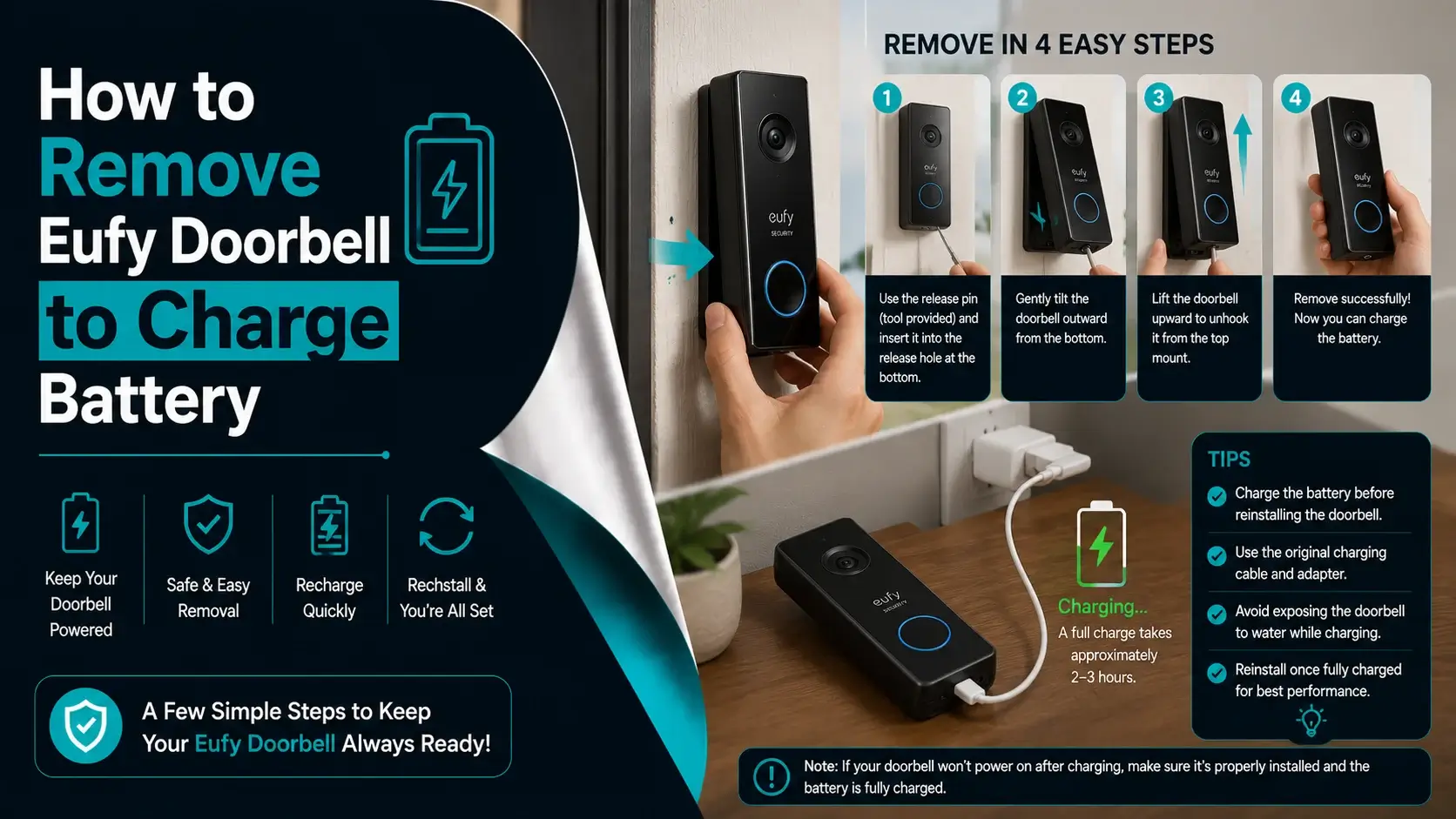
Steps to Remove Eufy Doorbell to Charge Battery
Step 1: Find the Release Hole
Look at the bottom edge of the doorbell. You’ll notice a tiny circular hole; that’s the release point. It’s the mechanism that locks the doorbell to its bracket.
Make sure you’re not poking the reset button or microphone hole by mistake; the release point is slightly larger and centered underneath the device.
Step 2: Insert the Detaching Pin
Take the release tool and gently push it into the hole. You’ll feel a small click or resistance as the latch inside disengages. There’s no need to push hard; just a steady, gentle press.
If you’re using a paperclip, make sure it’s clean and straight. It should slide in easily.
Step 3: Lift the Doorbell Upward
While keeping light pressure on the pin, lift the bottom edge of the doorbell upward and slightly forward. You should feel it loosen and then slide up off the bracket.
If it feels tight, don’t force it. Sometimes, a bit of dust or temperature change can make it grip tighter. Just wiggle it gently until it comes loose.

Avoid pulling the doorbell straight out from the wall; that’s a quick way to break the clip mechanism.
Step 4: Disconnect Wires (If There Are Any)
If your Eufy model is wired for constant power, there will be two small wires connected to the back. Take a quick photo before removing them; that way, you can reconnect them properly later.
Unscrew the tiny terminals gently and pull the wires free. If your doorbell is fully wireless, skip this step entirely.
Step 5: Plug It In for Charging
Flip the doorbell around and look for the USB port, usually on the back or bottom edge. Plug in your charging cable and connect the other end to a 5V/2A wall adapter.
Try not to use fast chargers; they can heat up the battery too quickly and shorten its lifespan. Eufy’s batteries prefer a slow, steady charge.
Place the doorbell somewhere flat and cool, like a desk or countertop, while it charges.
Step 6: Watch the LED Light
When charging starts, a solid orange light appears. That means everything’s working fine. Once the battery is full, the light turns blue.
A complete charge usually takes six to eight hours, depending on your model. If you can, let it reach 100% before reinstalling; it helps the battery last longer between charges.
Step 7: Reattach the Doorbell
Once it’s fully charged, unplug it and give the body a quick wipe with your cloth. Hold the doorbell just above the bracket, line up the top, and slide it down until you hear a click.
That click means it’s locked securely in place. Give it a gentle tug to double-check before letting go.
Step 8: Test Everything
Before walking away, make sure everything’s working properly. Press the doorbell button to test the chime, and open the Eufy app to confirm the live feed loads and the battery percentage looks full.
If it all checks out, congratulations. You’ve just handled your first Eufy recharge like a pro.
How Often Should You Charge the Battery?
Eufy’s battery-powered models are designed to go months on a single charge, but how long yours lasts depends on how busy your doorway is.
Here are a few factors that affect battery life:
- Activity level: More motion means more recordings.
- Video quality: 2K resolution uses more power than 1080p.
- Temperature: Cold weather drains batteries faster.
- Wi-Fi signal: A weak signal can make the device use extra energy to reconnect.
Most users end up charging every three to five months. If you fine-tune your settings, you can stretch it even longer.
Tips to Make the Battery Last Longer
You can reduce how often you need to remove your doorbell by adjusting a few settings:
- Fine-tune motion zones. Only monitor important areas like your porch or pathway.
- Lower the motion sensitivity. Avoid false alerts from cars or moving trees.
- Shorten the clip duration. Long recordings drain the battery quickly.
- Avoid constant live view. Checking it too often uses power.
- Update the firmware. Eufy frequently improves power efficiency through updates.
These small tweaks can make a noticeable difference in how often you need to charge.
What To Do If the Doorbell Feels Stuck?
Sometimes the doorbell refuses to budge. That’s fairly common, especially if it’s been installed for a while. Try this:
- Double-check that you’re pressing the release hole, not another opening.
- Apply gentle upward pressure, not outward pulling.
- Lightly tap the bottom while pressing the release pin.
Don’t use tools like knives or screwdrivers. They’ll scratch the body and could damage the locking clip.
Wired Models: No Removal Needed
If your Eufy is a wired version, you usually don’t have to remove it at all. The wiring keeps it charged automatically.
But if your app says “Not Charging” or the battery seems to be draining, check the transformer voltage or look in the Power Manager section of the app. Sometimes the wiring just needs tightening or a voltage adjustment.
Clean While You’re At It
Since the doorbell’s off the wall, it’s a good time for a quick clean. Use your soft cloth to wipe the lens, frame, and motion sensor. Avoid any liquids or cleaning sprays.
You can also check for dust, spider webs, or small debris that could interfere with motion detection. A clean lens gives clearer footage and helps the sensor perform accurately.
Safety Tips for Charging
A few reminders to keep your doorbell (and your home) safe:
- Charge indoors, away from moisture or direct sunlight.
- Use only Eufy-approved or high-quality cables.
- Avoid overnight charging when possible.
- Handle the doorbell carefully to prevent scratching the lens.
- For wired models, switch off the power before disconnecting wires.
Simple precautions like these help prevent accidents and extend your device’s lifespan.
Battery Care and Longevity
Eufy batteries are built for hundreds of charge cycles, but how you treat them matters. Always charge them slowly using a 5V/2A adapter, and store the doorbell in a cool, dry space when not in use.
Avoid letting the battery drain completely before recharging; that helps maintain its capacity. Also, keep your app updated; new firmware often improves battery management and performance.
Final Thoughts
Once you’ve done it once, removing and charging your Eufy doorbell becomes second nature. It’s a simple process that just requires patience and care.
By charging properly, cleaning occasionally, and keeping your firmware updated, you’ll make sure your doorbell continues working perfectly without any error, giving you peace of mind and a safer home.
The next time your phone notifies you that the battery’s low, you’ll know exactly what to do.